

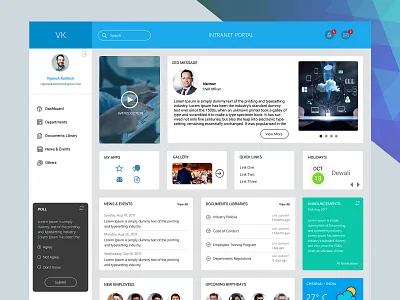
In today’s digital workplace, an intranet portal is more than just a repository of information. It serves as the backbone of internal communication, collaboration, and knowledge sharing within an organization. A well-designed intranet portal can enhance productivity, streamline workflows, and foster a sense of community among employees. However, creating an effective intranet portal requires careful planning, design, and user-centered thinking. This article explores the best practices for designing an intranet portal that truly meets the needs of your organization and its employees.
Understanding the Purpose of an Intranet Portal
Before diving into design considerations, it’s essential to clarify the primary goals of your intranet portal. Is it intended to improve communication, centralize resources, support collaboration, or all of the above? Understanding the purpose will guide every design decision, from navigation to content organization. A clear focus ensures that the intranet portal remains relevant and valuable to employees rather than becoming a cluttered, underused platform.
Prioritizing User Experience
An effective intranet portal places the user experience at the forefront. Employees should find it easy to navigate, search for content, and complete tasks. A clean, intuitive interface reduces frustration and encourages regular use. Key components of user experience include consistent layout, clear labeling, responsive design for different devices, and accessibility for all employees. User testing and feedback during development can uncover pain points and opportunities for improvement.
Streamlining Navigation and Information Architecture
A common challenge with intranet portals is information overload. Employees can easily become overwhelmed if content is poorly organized. Implementing a logical information architecture is crucial. Group related content into categories, use clear headings, and provide quick links to frequently used sections. A well-thought-out navigation system allows users to find what they need efficiently. Incorporating search functionality with filters and predictive text further enhances usability, making your intranet portal a true productivity tool.
Personalization and Role-Based Access
Every employee interacts with the intranet portal differently depending on their role and responsibilities. Personalization features can tailor content, news, and updates to individual users, making the experience more relevant. Role-based access ensures that sensitive information is restricted to authorized personnel while providing general resources to the broader workforce. Personalization not only improves engagement but also helps employees focus on information that directly impacts their work.
Integrating Collaboration Tools
Modern intranet portals should do more than store documents—they should facilitate collaboration. Integrating tools such as team chat, project management boards, discussion forums, and document sharing enhances communication and teamwork. Collaboration features encourage knowledge sharing and reduce reliance on email for internal discussions. When employees can collaborate seamlessly within the intranet portal, it becomes a central hub for productivity rather than just an information source.
Ensuring Mobile Accessibility
With an increasingly mobile workforce, your intranet portal must be accessible on smartphones and tablets. Mobile-friendly design ensures that employees can access critical information, submit requests, or collaborate while on the go. Responsive design, fast load times, and optimized interfaces for smaller screens are essential elements. A mobile-accessible intranet portal supports remote work, field teams, and employees who travel frequently, keeping everyone connected regardless of location.
Maintaining Up-to-Date Content
An intranet portal loses its value if content becomes outdated or irrelevant. Regularly reviewing and updating information ensures accuracy and reliability. Establishing content governance policies, assigning content owners, and scheduling periodic audits can prevent outdated materials from cluttering the portal. Up-to-date content not only builds trust but also encourages employees to rely on the intranet portal as a primary resource for information and procedures.
Emphasizing Search Functionality
Even with excellent navigation, search functionality is indispensable for a large intranet portal. Employees should be able to quickly locate documents, policies, or contacts using intuitive search tools. Features such as keyword suggestions, advanced filters, and search result ranking enhance efficiency. A robust search function reduces time spent hunting for information and increases the overall productivity of the intranet portal.
Promoting Engagement Through Communication
An intranet portal should foster communication and engagement within the organization. Highlighting company news, employee achievements, and upcoming events creates a sense of community. Interactive features such as polls, discussion boards, and feedback forms encourage participation. When employees feel engaged and informed, they are more likely to use the intranet portal regularly, making it a central part of organizational culture.
Security and Compliance Considerations
An intranet portal often contains sensitive information, including HR documents, financial records, and proprietary data. Ensuring robust security measures such as encryption, secure login, and regular audits is critical. Compliance with data protection regulations should be a top priority to safeguard employee and organizational information. A secure intranet portal builds confidence among users and protects the company from potential breaches or legal issues.
Measuring Success and Continuous Improvement
Launching an intranet portal is just the beginning. To maintain effectiveness, organizations should monitor usage metrics, gather user feedback, and assess how well the portal meets its objectives. Analytics can provide insights into popular content, frequently used features, and areas that require improvement. Regularly iterating and enhancing the intranet portal ensures that it evolves with the organization’s needs and remains a valuable resource over time.
Conclusion
Designing an effective intranet portal requires a thoughtful balance of usability, functionality, and engagement. By focusing on user experience, clear navigation, personalization, collaboration, mobile access, content management, and security, organizations can create an intranet portal that supports employees, enhances productivity, and strengthens internal communication. A successful intranet portal is not just a digital tool—it becomes the central hub for connection, collaboration, and organizational efficiency. Following these best practices ensures that your intranet portal serves as a dynamic and indispensable part of your workplace.
The right intranet portal can transform the way employees work, communicate, and engage with company resources. Investing time and effort into thoughtful design, continuous improvement, and user-centric features will pay dividends in productivity, satisfaction, and organizational success.